1. Introduction
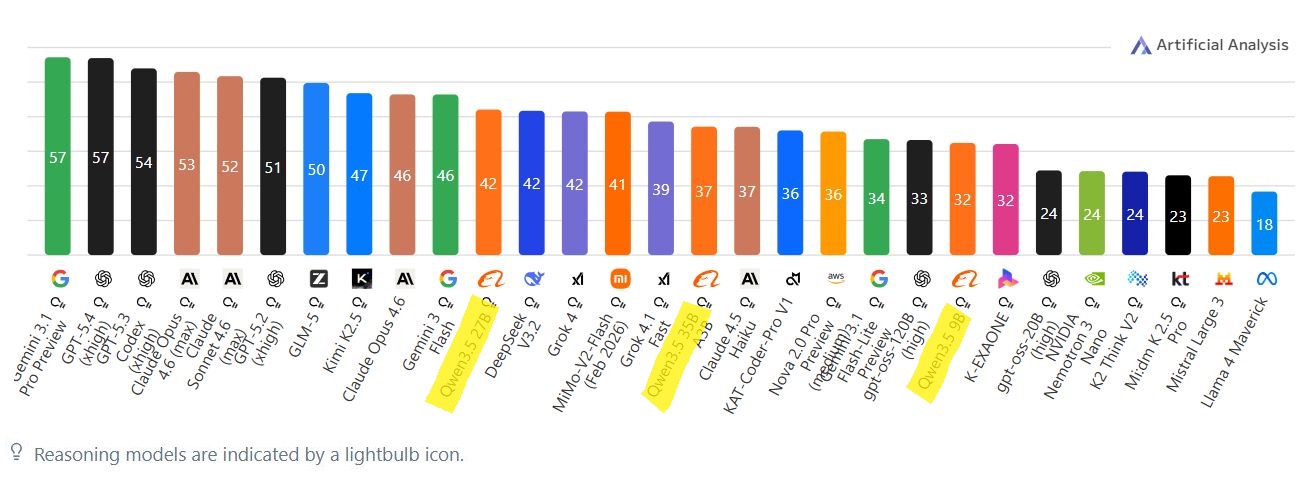
The intersection of a high-supply second hand market for retired enterprise hardware and consumer-grade graphics processing units creates a new landscape for the homelab enthusiast and software developer. The recent deployment of Alibaba's Qwen3.5 series, comprising both dense architectures (27B) and highly efficient MoE (35B-A3B) variants represents a pivotal shift toward high-density parameter efficiency. As illustrated below, this new generation of models is an unprecedented revolution for home servers, bringing proprietary-level reasoning capabilities directly to local, air-gapped environments.
Inspired by the $750 AI Build featured on the YouTube channel Digital Spaceport, this research investigates the viability of executing these new models on budget-constrained infrastructure. The target hardware is a highly cost-effective dual-GPU rig based on an HP Z440 Workstation alongside two NVIDIA RTX 3060 12GB GPUs, providing a total of 24GB of VRAM.
2. Hardware
The specific configuration used for this evaluation is as follows:
- Workstation: HP Z440
- CPU: Intel Xeon E5-1620 v3 - Haswell architecture
- GPUs: 2x NVIDIA RTX 3060 (12GB VRAM each, 24GB total)
- Memory: 32GB DDR4 RAM
- Storage: Standard SATA SSD (550MB/s R/W) for loading models
- Operating System: Debian 13 Testing

While the CPU is amazingly fast, the Z440 is constrained by PCIe Gen3 bandwidth limits (approximately 15.75 GB/s per x16 slot). Optimizing communication between two GPUs across this bus is by far the biggest bottleneck when running models that must be split across both cards.
Total build cost was 700 €. Computer was 200€ (RAM included) and each GPU was 200 €. (mid 2025)
3. The Hidden Cost of GUIs
To establish a performance baseline, I evaluated the speed of LM Studio, a popular pre-packaged GUI tool, against a manually compiled, bare-metal llama.cpp inference engine.
While LM Studio provides easy accessibility for novices, its underlying Electron framework adds useless VRAM overhead. Initiating the Chromium processes and Node.js runtime can consume up to 1.5GB to 3GB of system RAM, plus an additional ~100MB of critical VRAM merely to render the interface. In a 24GB VRAM ecosystem, every megabyte counts.
Furthermore, standard GUI wrappers rely on generic, "lowest common denominator" binaries. While great because, once again, it is readily available and works out of the box for all the x86_64 CPUs, they fail to leverage the specific instruction sets the host CPU might have available, leaving substantial performance on the table during the prompt-ingestion and inference phase.
| Metric | Custom llama.cpp | LM Studio (GUI) |
|---|---|---|
| Idle RAM | ~50 - 150 MB | 1.5 - 3.0 GB |
| Startup Latency | Near-instant (mmap) | 5 - 15 seconds |
| Thread Control | Direct core pinning | Abstracted |
| VRAM Overhead | 0 MB | ~100 MB |
4. exploiting ik_llama.cpp for inference speed gains
While llama.cpp is designed for maximum compatibility across architectures and devices, ik_llama.cpp narrows its focus to Nvidia-specific CUDA optimizations, specifically adressing the biggest bottlenecks of LLM inference: memory bandwidth and kernel overhead.
ik_llama.cpp changes how the KV cache is structured to maximize NVIDIA’s L2 cache hit rates. One of the best performance gains in ik_llama.cpp comes from the use of Hadamard Transforms for the K-cache. This is a mathematical trick that spreads out the values in the key tensors before quantization. This allows for higher accuracy at lower bit-rates (like Q4_0 which is perfect for us) without the usual "outlier" problems that plague standard 4-bit KV caches. arXiv:2510.05373 explains this mechanism in details.
While both engines now support Paged Attention (breaking the KV cache into "blocks" to prevent fragmentation), ik_llama.cpp integrates this with its Fused MoE kernels. For MoE models like Qwen3 or DeepSeek, ik_llama.cpp can dynamically route tokens to experts without breaking the "paged" flow, whereas mainline can sometimes experience "stalls" as it moves between different memory pages for different experts.

5. squeezing even more tok/s with compilation flags
To bypass these limitations, I manually rebuilt llama.cpp and ik_llama.cpp from source on Debian 13, applying flags tailored explicitly to the Xeon E5-1620 v3 architecture. Using the -march=haswell flag rather than the generic -march=native forces the compiler to utilize refined heuristics for the Haswell pipeline, enabling AVX2, FMA3, and BMI2 instruction sets with optimized scheduling.
Additional optimization was achieved by integrating the Intel oneAPI Math Kernel Library (-DGGML_BLAS=ON), offloading CPU-side math to hand-tuned assembly kernels. Finally, Link Time Optimization (-flto) was applied to reduce cross-file overhead. The exact cmake command used to construct this highly optimized build, specifically targeting the RTX 3060's Ampere architecture (Compute Capability 8.6), is provided below:
~$ cmake -B build -DGGML_CUDA=ON -DCMAKE_CUDA_ARCHITECTURES=86 \
-DCMAKE_C_FLAGS="-march=haswell -O3 -flto" \
-DCMAKE_CXX_FLAGS="-march=haswell -O3 -flto"

~$ cmake --build build --config Release -j 8
6. MoE vs. Dense Architectures
The experiment evaluated two models with an 8K context window configuration. The results definitively prove that MoE architectures are the future for budget rigs.
The Qwen3.5 27B (Dense) model utilizes all 27 billion parameters for every token generated. Unsurprisingly, both systems performed similarly here, with the custom build slightly surpassing LM Studio (17.9 tok/s vs 14.31 tok/s).
However, the Qwen3.5 35B-A3B (MoE) model radically altered the paradigm. Despite housing 35 billion parameters, the routing mechanism only activates approximately 3 billion parameters per token. This extreme sparsity drastically reduces the required memory bandwidth for computation. A full breakdown of these findings is documented below:
| Metric | Qwen3.5 27B (Dense) | Qwen3.5 35B-A3B (MoE) |
|---|---|---|
| Total Parameters | 27.0 Billion | 35.0 Billion |
| Active Parameters / Token | 27.0 Billion | ~3.0 Billion |
| Speed: LM Studio's llama.cpp | 14.31 tokens/sec | 12.64 tokens/sec |
| Speed: Custom llama.cpp | 15.40 tokens/sec | 34.00 tokens/sec |
| Speed: Custom build of ik_llama.cpp | 17.90 tokens/sec | 70.12 tokens/sec |
| Performance Delta (Custom ik_llama.cpp build vs LM Studio's llama.cpp) | 1.25x faster | 5.53x faster |
Note that the performance of the 35b a3b model on LM Studio was horrendous. This is due to LM Studio's GPU offloading strategy. Even with all the safeguards off, LM Studio would refuse to offload all the layers to the GPU.
7. Context Window Strategy
Managing the Key-Value (KV) cache is the final hurdle for 24GB systems. The KV footprint grows linearly and can trigger Out-of-Memory (OOM) failures if unchecked. The requirement can be mathematically modeled as:
Where \(N\) is the context length, \(L\) is the layer count, \(H_{dim}\) is the hidden dimension, and \(GQA\) is the Grouped-Query Attention factor. Because the 35B-A3B model features a smaller hidden dimension and fewer layers than the 27B dense variant, its KV cache footprint is remarkably minimal (only ~0.34 GB for an 8K context vs 1.78 GB for the 27B model, as detailed in Table 2).
To maximize context length, users should apply 4-bit KV quantization flags (-ctk q4_0), allowing the MoE model to process massive documents within budget constraints.
7.1 Sizing the Context for Vibe Coding and Dialogue
For software engineers engaging in vibe coding, the context window must accommodate not only the user's codebase but also the model's internal cognitive monologue. A 32K token context is generally considered the "good enough" sweet spot for this workflow. It provides ample room for 5-10 mid-sized source files, iterative debugging history, and the model's generated reasoning chains, all while fitting securely within the 24GB VRAM pool using 4-bit KV quantization.
Conversely, for a standard conversational back-and-forth involving general queries and logic puzzles, an 8K to 16K token context is optimal. This ensures fast prompt ingestion (prefill) while leaving enough headroom for the model's thinking tokens without prematurely forcing context eviction.
7.2 Managing the Generation Budget: The -c and -n Parameters
Reasoning MoE models like Qwen3.5 35b-a3b are known for thinking too much and filling the context window very quick. Left unchecked, the model may generate thousands of <think> tokens before producing a final answer and ending up causing context eviction.
Because the --reasoning-budget flag in llama.cpp doesn't give you the possibility to set an actual reasoning budget with a tokens number (either -1 for unrestricted thinking or 0 for disabled thinking, that's it), control over this cognitive overhead must be done using the context size (-c) and max prediction (-n) flags. Adjusting these two flags prevents the model from falling into infinite reasoning loops. It is important to try out different combinations of values to see which one works the best for you. Here is my suggested formula to explain the context limit:
Where \(C_{limit}\) is the total allocated KV cache (-c) flag, \(N_{prompt}\) is the size of the ingested codebase, and \(N_{predict}\) (-n flag) is the upper limit fixed for both the reasoning and the final output combined. By constraining \(N_{predict}\), you establish "compute budget" that forces the model to conclude its monologue within your set limits. This will directly influence your tokens-per-second (tok/s) during inference.
| context flags | Target Use Case | Quality Impact | Latency & VRAM Efficiency |
|---|---|---|---|
| -c 32768 -n 8192 |
Vibe coding | Maximum logical coherence; deep thinking permitted before answering. | High VRAM pressure; prefill latency increases; risks out-of-memory but worth to try and see if it works on your machine. |
| -c 8192 -n 2048 |
Multi-turn chat | Optimal balance; provides sufficient space for good logic without useless AI monologues. | Medium latency, good for long sessions, fits easily in our 24GB VRAM. |
| -c 2048 -n 512 |
Quick chat, code refactoring, syntax checks | Good enough for daily Q&A | highest tok/s. |
8. Architectural Bottlenecks and the RTX 3090 Alternative
While the dual-RTX 3060 setup is exceptionally cost-effective, it is inherently constrained by the older architecture of the HP Z440 platform. The primary bottleneck is the Intel C612 chipset's reliance on the legacy PCIe Gen 3 bus. When a large model is split across two discrete GPUs, the computational workload requires constant communication, tensor shuffling and activation passing between the cards. Because this communication occurs over a PCIe Gen 3 interface (capped at roughly 15.75 GB/s per slot), interconnect latency significantly throttles the theoretical compute maximum. Upgrading the SATA SSD to an NVMe M2 SSD using a PCIe interface card would also improve by a lot the loading time of the models for a reasonable extra ±$80.
This penalty means the GPUs spend precious milliseconds waiting for data to travel across the motherboard rather than generating tokens. Offloading all model weights into a single, monolithic 24GB VRAM pool such as an NVIDIA RTX 3090 completely eliminates this PCIe interconnect penalty. Internal benchmarking suggests that executing the same MoE model on a single RTX 3090 yields an approximate 2x performance boost in tokens per second compared to the split dual-3060 configuration.
However, this upgrade changes the total price of the build. Sourcing a used RTX 3090 will definitely add a $300 premium to the total rig cost over the dual-RTX 3060s and the price of used GPUs has been steadily increasing in the last 3 years. For the absolute tightest budgets, the $750 dual-3060 setup remains an unparalleled, undefeated entry point. But for practitioners willing to push their budget slightly past the $1,000 threshold, stepping up to a single RTX 3090 represents the ultimate performance ceiling for budget at-home inference.
9. Qwen3.5 is a whole new paradigm for AI homelabs
The release of the Qwen3.5 series has been one of the biggest improvements in the open-weights community in the last 3 years. Until very recently, operating within a 24GB VRAM ceiling necessitated significant compromises in code quality, context window and overall usefulness of such a setup. Developers were largely confined to using aggressively fine-tuned models such as Apriel-v1.6-15B-Thinker or NVIDIA Nemotron 3 Nano. While these models demonstrated adequate capabilities within their narrow training domains, their cognitive and coding skills ceilings were apparent when generating and running their code, typically plateauing at an Artificial Analysis Intelligence Index of approximately 28 at best.
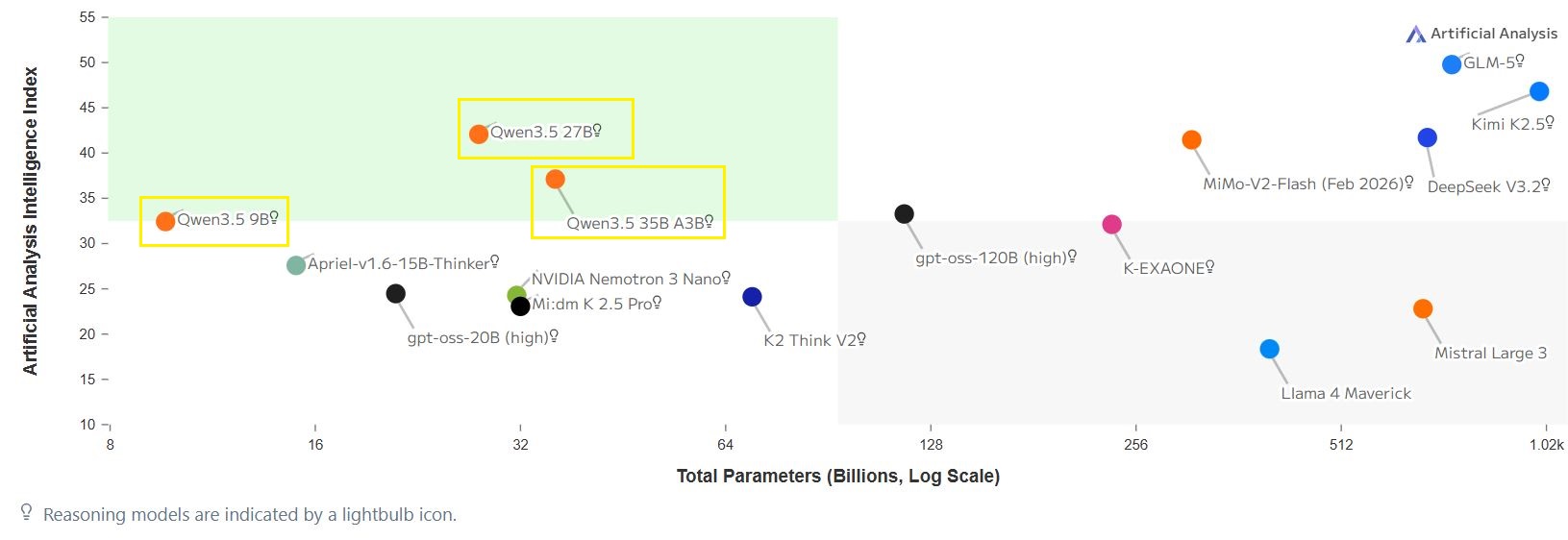
By leveraging its new routing mechanism and bypassing the computational bottleneck of a dense network, the Qwen3.5 architecture achieves an Artificial Analysis Intelligence Index of 42. This jump in intelligence effectively puts local low VRAM footprint models at a production-grade vibe coding engine level. It definitively proves that frontier-adjacent intelligence can be sustained at a perfectly usable speed (70 tokens per second) on legacy hardware.
Here is a showcase of some web apps generated by Qwen3.5-35b-a3b (unsloth Q4_K_S GGUF):
Example 1: Kanban App
Example 2: Pong for DOS Allegro
View Demo

10. Bottom line
The narrative that high-performance AI is gated behind unaffordable hardware costs is no longer true. By ditching Electron-based graphical interfaces and recompiling llama.cpp, tuned to your specific CPU, a 700€ machine can achieve 70 tokens per second on a 35B parameter model that delivers code quality close to Gemini 3 Flash.
For developers requiring local code-assist or heavy text processing without API fees, the combination of a dual-RTX 3060 workstation and MoE architectural optimization is not just viable, it is currently the absolute gold standard for budget AI engineering under $1000. People working in critical fields like defense, energy and vehicle simulation will quickly see the benefit of running a local LLM.
While it is true that the DDR4 and DDR5 RAM prices have significantly increased YoY since 2025, it is still feasible to buy a reatively cheap AI inference server in early 2026.
| Model name | Domain | Generation time |
|---|---|---|
| Flux2 Klein 9b | Image | 20 seconds for one image |
| Z-Image Turbo | Image | 20 seconds for one image |
| Hunyuan 3D 2.0 | 3D model + texturing | 5 minutes |
| Qwen3 TTS | Text-to-speech and voice cloning | 30 seconds for a 10 seconds clip |
| Wan 2.2 14B | Video | 5 minutes for an 8 seconds video |
Further readings
- Digital Spaceport. Local AI Home Server Build at Mid-Range $750 Price. Available at:
https://digitalspaceport.com/local-ai-home-server-build-at-mid-range-750-price/ - Utkarsh Saxena, Kaushik Roy. KVLinC : KV Cache Quantization with Hadamard Rotation and Linear Correction
. Available at:
https://arxiv.org/abs/2510.05373 - Alibaba Qwen Team. Qwen3.5: Accelerating Productivity with Native Multimodal Agents. Available at:
https://qwen.ai/blog?id=qwen3.5 - Reddit. New Qwen3.5-35B-A3B Unsloth Dynamic GGUFs + Benchmarks. Available at:
https://www.reddit.com/r/LocalLLaMA/comments/1rgel19/new_qwen3535ba3b_unsloth_dynamic_ggufs_benchmarks/